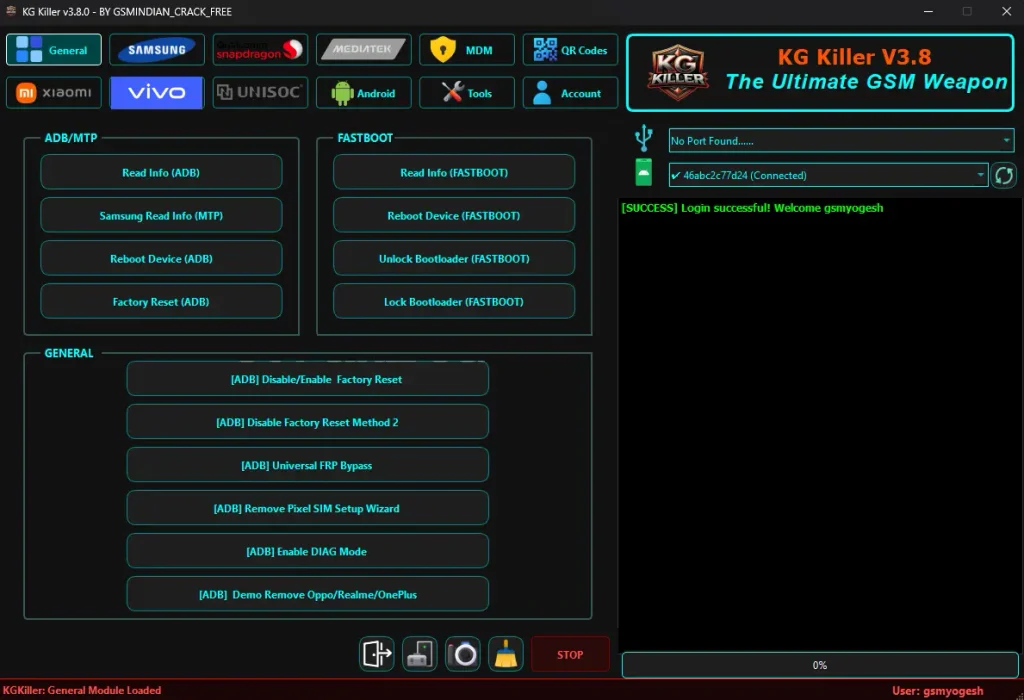
KG Killer Tool v3.8.0 is a Windows-based mobile servicing tool that supports Samsung, Qualcomm, Xiaomi, Vivo, and other Android devices. It includes options for reading device information, ADB, Fastboot, FRP, MDM, IT Admin, firmware flashing, and Android app management.
The latest version adds support for 40 Qualcomm devices, including ASUS and Huawei/Honor models. It also brings new Qualcomm FRP reset, factory reset, and servicing options, making it useful for mobile technicians who work with different Android brands.
KG Killer Tool v3.8.0 Features
- Read Device Info via ADB, MTP & Fastboot
- Factory Reset & Reboot Options
- Samsung KG, Knox & MDM Services
- Samsung FRP Service Options
- Samsung Account Removal
- Samsung Odin Firmware Flashing
- Qualcomm FRP & Factory Reset
- Qualcomm Firmware Flashing
- Partition Read, Write & Erase
- Fastboot Bootloader Options
- Xiaomi FRP & Mi Cloud Services
- Xiaomi Fastboot & EDL Options
- IT Admin Services for Android 15 & 16
- Vivo IT Admin & Demo Options
- QR Code Tools for ADB & HyperOS
- APK Install, Uninstall & Management
- Live Android Screen via ADB
- OTA Update Controls
- Driver Download & Installation
- 40 New Qualcomm Devices Added
- New ASUS & Huawei/Honor Device Support
KG Killer Tool v3.8.0 Download Link
File Password 👉 gsmyogesh.com
Google Drive 👇 https://drive.google.com/file/d/1H7_EIShr6dkfPckjEfQNV53eFs9yawsd/view?usp=sharing
Mega 👉 https://mega.nz/file/mwYQTDgZ#I1Fl2e9-8jxLTxGG_FBtEzEoEqNycZCL712HUJlGyro
Login Details for KG Killer Tool v3.8.0
- Username: gsmyogesh
- Password: gsmyogesh
How to Install KG Killer Tool v3.8.0
- Download the KG Killer Tool RAR file.
- Extract the archive using WinRAR or another extraction tool.
- Enter the extraction password:
gsmyogesh.com - Open the extracted folder and find
KG_Tool_Latest.exe. - Right-click the EXE file and select Run as administrator.
- Enter the provided login details if authorized for your copy.
- Read and accept the terms and conditions if you agree.
- Wait for the main interface to open.
- Select the module you need, such as Samsung, Qualcomm, Xiaomi, Vivo, Android, or Tools.
- Connect your device in the required mode and install the necessary drivers before use.