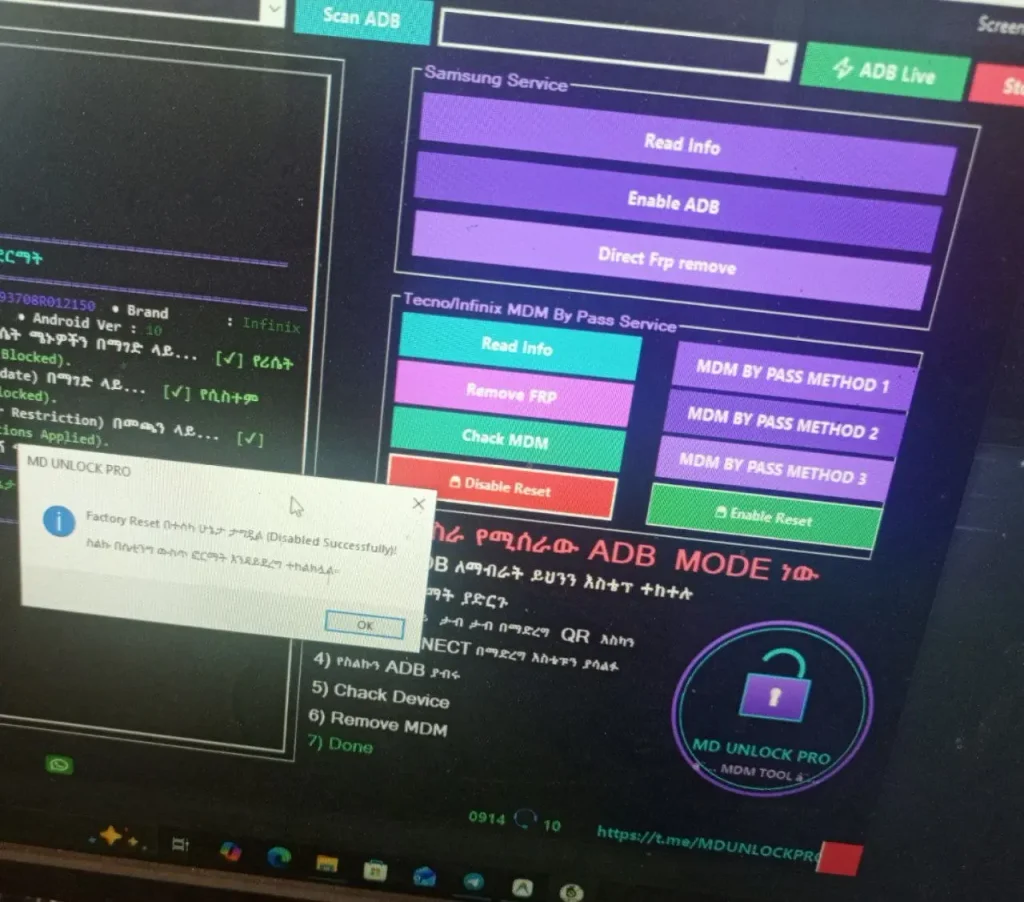
MD UNLOCK PRO MDM TOOL is a portable mobile servicing tool for Samsung, Tecno, and Infinix devices. It includes options like Read Info, Enable ADB, FRP services, and MDM check. The tool also has Scan Port and Scan ADB options for device detection.
It comes with a simple interface and separate service sections for Samsung and Tecno/Infinix devices. The tool also includes three MDM service methods and an information panel to show device and operation details.
MD Unlock PRO MDM Tool Features
- Samsung Service Support
- Tecno & Infinix MDM Services
- Read Device Info
- Enable ADB
- FRP Service Options
- MDM Check
- Scan Port
- Scan ADB
- 3 MDM Service Methods
- Device Information Panel
- Operation Log Panel
- Stop Operation Button
- Screenshot Option
Download Link
MD Unlock PRO MDM Tool 👇 https://mega.nz/file/WpgEHDTJ#3rn1Cd8bpNjg0uTv3dO-nOUCi3-9ms20VLNT76djVAM
How To Install MD Unlock PRO MDM Tool
- Download the MD UNLOCK PRO MDM TOOL RAR file.
- Extract the RAR file using WinRAR.
- Open the extracted folder and keep the DATA folder in the same location.
- Find the MDM UNLOCKER.exe file outside the DATA folder.
- Right-click it and select Run as administrator.
- Once the tool opens, connect your device and use the available service options.