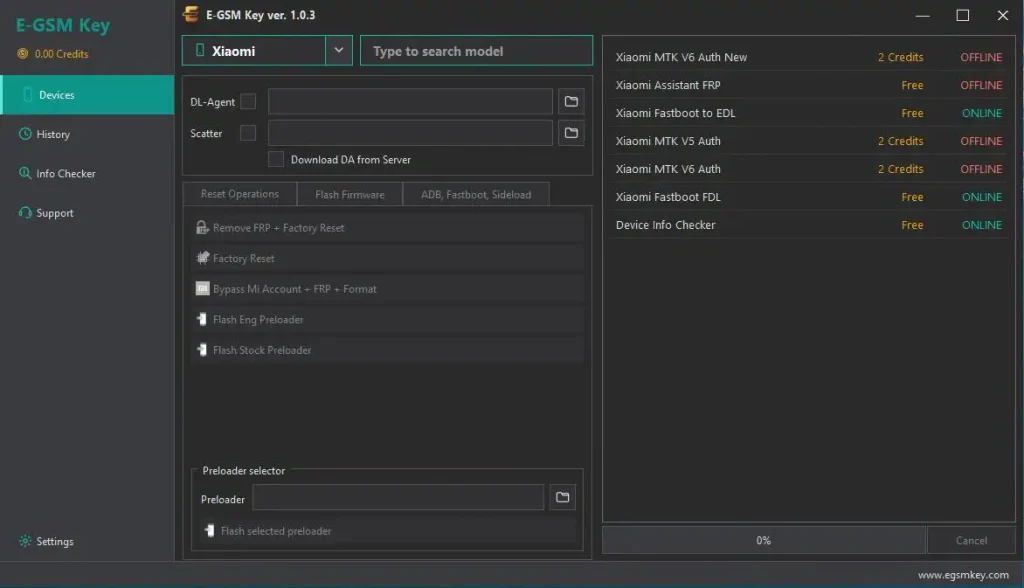
E-GSM Key v1.0.2 is a Xiaomi service tool for Qualcomm, MediaTek, and Unisoc devices. It supports Fastboot, Sideload, and ADB modes for tasks like firmware flashing, device info, FRP, and other Xiaomi service work. The listed services are currently available online and free to use.
E-GSM Key Supported Platforms:
- ✅ Qualcomm
- ✅ MediaTek
- ✅ Unisoc
- ✅ Fastboot
- ✅ Sideload
- ✅ ADB
E-GSM Key Functions
- Flash Firmware
- Remove FRP
- Factory Reset
- Remove Mi Account
- Read Device Info
- Backup / Restore / Wipe EFS
- Fastboot to EDL
- Unlock / Lock Bootloader
- Flash Preloader
- ADB Reboot & Diag Mode
Qualcomm
- Xiaomi 15, 14, 17 Max
- Xiaomi Mi 10 / 10 Pro / 10T Pro
- Xiaomi Mi 11 Lite
- POCO F1, F3, F8 Pro, M3, M7, X8 Power
- Redmi Note 9 Pro / 9S, Note 14 Pro+
- Redmi K20, K100 Pro
- Xiaomi CIVI 4
- MIX Flip 2
- Mi Pad 5 Pro 12.4
MediaTek
- Xiaomi 14T, 13T, 13T Pro, 11T, 17T
- Xiaomi 12 Pro Dimensity
- Redmi A3 / 12C 5G / Note 14 5G / Note 15 Pro 4G
- Redmi K60 Ultra / K80 Ultra
- Redmi Turbo 5 Max
- Redmi 15C
- POCO C61, M7 Pro 5G, C85, X8 Pro Max
Unisoc
- Redmi A7 Pro
- POCO C81 Pro
- Redmi A3x
- Redmi A5
Download E-GSM Key v1.0.2 Link
E-GSM Key 👉 https://mega.nz/file/b45VwZQA#vnsYXapY3lrOdOBqVq-VaonWs2AMTImXRIS0m3A-RI8
How To Install E-GSM Key v1.0.2
- Open your Downloads folder.
- Run E-GSMKey_Setup.exe.
- If Windows shows a warning, click More info and then Run anyway.
- Choose the install folder and click Next.
- Select the desktop shortcut option if needed.
- Click Install and wait for it to finish.
- Select Launch E-GSM Key and click Finish.
Register and Login
- Visit egsmkey.com and click Register.
- Enter your name, email, and password.
- Open your account dashboard after registration.
- Check your license and account details.
- Open E-GSM Key from the desktop.
- Enter your registered email and password.
- Click Log In and wait for the main interface to load.