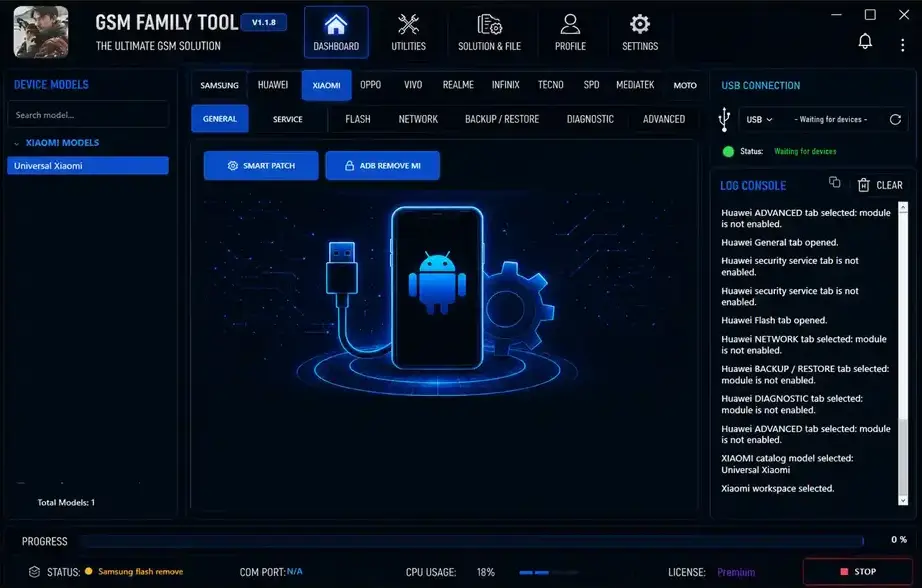
GSM Family Tool v1.1.8 is a mobile servicing tool that supports many brands and chipsets. It includes options for Samsung, Huawei, Xiaomi, Oppo, Vivo, Realme, Motorola, Tecno, Infinix, MediaTek, and Unisoc. The tool offers features for ADB, flashing, backup, restore, FRP, bootloader, and META Mode.
The latest update brings better Huawei and HONOR flashing, new Tecno and Infinix support, improved META Mode operations, and more fixes. It also includes a simple interface with Dashboard, Utilities, Solution & File, Profile, and Settings sections.
GSM Family Tool Features
Samsung
- Universal Samsung support
- Galaxy A03 to A72 support
- Galaxy S20 and S21 support
- KG Remove via ADB
- Read device info
- Activate ADB
- Reboot System, Recovery, and Download
- DNS services
Huawei / HONOR
- Universal Huawei support
- P20–P40 Pro and Mate 20–40 Pro support
- Nova and Y-series support
- Honor 8X support
- Read device info via ADB, Fastboot, and USB Update Mode
- Firmware flashing
- Update Mode flashing
- Partition and repartition options
Xiaomi / Oppo
- Smart Patch
- ADB Mi Account removal
- Oppo ADB removal
- Oplusreserve patch options
SPD / Unisoc
- Support for SC9863A, T606, T610, T612, T616, and T700
- Read device info and GPT
- Factory reset and safe format
- FRP and bootloader options
- PAC file flashing
- Backup and restore
- Read, write, search, and erase partitions
- APK install, remove, disable, and backup
- EROFS and Dynamic Partition tools
MediaTek
- META Mode support
- Factory reset and FRP options
- META patch
- Boot in and exit META Mode
- PayJoy support
- Tecno and Infinix security patch support
Motorola
- Universal Motorola support
- Bootloader options
- FRP and Misc patch
- ADB and Fastboot tools
- flashfile.xml and servicefile.xml support
- Single IMG partition flashing
Other Features
- Vivo, Realme, Infinix, and Tecno support
- Dashboard and Utilities
- Solution & File section
- Profile and Settings
- Live status panel
- Real-time log console
- USB/COM port status
- CPU usage monitor
- Progress bar
Download Link
GSM Family Tool 👇https://mega.nz/file/KwA20DpC#2Siz9GX2wiTm0uxDmaWvXNiX9gBMh0R-Ar6RZDdjBHY
Extract password: Royal123@
username and password randomly or use – gsmsheraz
How To Install GSM Family Tool
- Download the GSM Family Tool RAR file.
- Put the RAR file on your desktop.
- Right-click the file and select Extract to “GSM Family Tool”.
- Enter the password Royal123@ and click OK.
- Open the extracted folder.
- Find and open Lo@der.exe.
- Wait for the GSM Family Tool License Manager to open.
- Click the LOGIN button.
- If Windows asks for permission, click Allow access.
- Enter any username and password to log in.
- Wait for the main tool window to open.
- Check the Log Console for “Application started.”